Payroll
Records current platform, owner, source of truth, connector approach, migration strategy, and synchronization approach for labor cost and approved hours.

Connected Operations Center
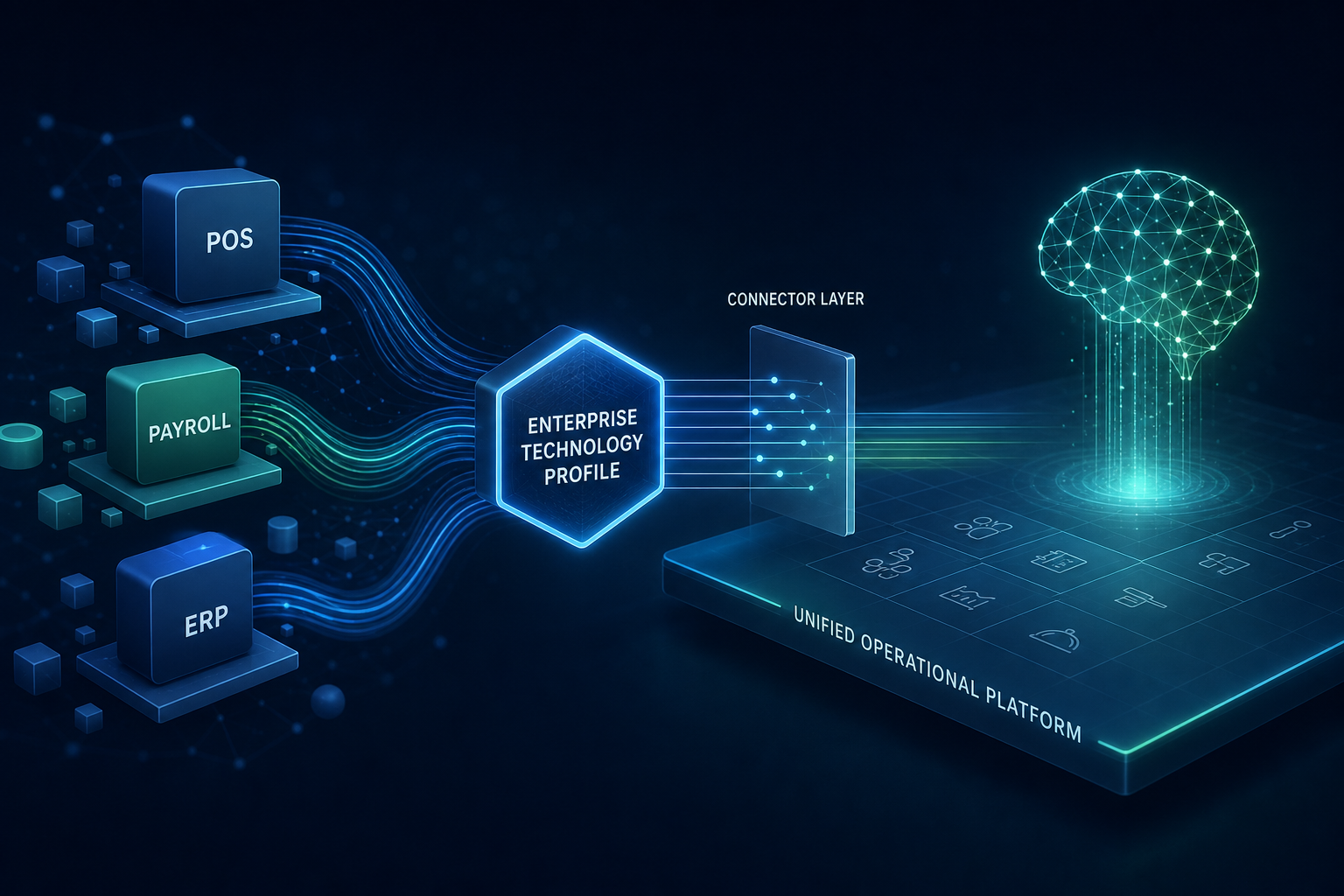
MiseCentral is designed to connect with your existing business systems—not force you to replace them. During onboarding, we build an Enterprise Technology Profile that understands your technology ecosystem, identifies your systems of record, and creates a governed migration and integration strategy.
Enterprise Technology Profile
During implementation, MiseCentral documents your current systems, business owners, systems of record, available connector approaches, migration and synchronization plans, field mapping, data validation, integration health, and future expansion—so connectivity is planned, not improvised. Connectors are translation layers into MiseCentral Business Objects—not separate operational systems.
Records current platform, owner, source of truth, connector approach, migration strategy, and synchronization approach for labor cost and approved hours.
Records current platform, owner, source of truth, connector approach, migration strategy, and synchronization approach for sales, items, and depletion signals.
Records current platform, owner, source of truth, connector approach, migration strategy, and synchronization approach for shifts, roles, and labor windows.
Records current platform, owner, source of truth, connector approach, migration strategy, and synchronization approach for employee master data and role context.
Records current platform, owner, source of truth, connector approach, migration strategy, and synchronization approach for journals, COGS, and financial alignment.
Records current platform, owner, source of truth, connector approach, migration strategy, and synchronization approach for materials, orders, and enterprise masters.
Records current platform, owner, source of truth, connector approach, migration strategy, and synchronization approach for pick, pack, put-away, and lot moves.
Records current platform, owner, source of truth, connector approach, migration strategy, and synchronization approach for SSO, directory sync, and access mapping.
Records current platform, owner, source of truth, connector approach, migration strategy, and synchronization approach for catalog, availability, and fulfillment context.
Records current platform, owner, source of truth, connector approach, migration strategy, and synchronization approach for proprietary and legacy systems.
Technology Interview
We begin with your business and current technology—not by replacing software. The Technology Interview feeds the Enterprise Technology Profile, then deciding which system owns each type of information, connector configuration, validation, pilot, go-live, and ongoing Business Review.
See also the broader Implementation & Onboarding framework for rollout models and training.
Connected Ecosystem
Your business already has technology. MiseCentral connects it, organizes it, learns from it, and improves it—without requiring an immediate rip-and-replace. Every connector translates external data into MiseCentral Business Objects. The Enterprise Technology Profile makes your ecosystem visible: what exists, what is authoritative, and what can migrate when you are ready.
Illustrative categories—no vendor logos or certifications.
Adaptive Operating System
Illustrative results from a connected operational layer.
deciding which system owns each type of information
Illustrative example only. Your Technology Interview produces a customer-specific map. MiseCentral creates a governed migration and synchronization plan from that map—not a one-size-fits-all cutover.
| Business Domain | Current System (illustrative) |
|---|---|
| Employees | ADP |
| Payroll | ADP |
| Scheduling | 7shifts |
| POS | ECRS |
| Inventory | ECRS |
| Accounting | QuickBooks |
| Purchasing | QuickBooks |
| Recipes | Excel |
| Food Safety | Paper |
| Production | Existing process |
Different vendors use different identifiers, field names, data models, and sync behavior. MiseCentral maps those differences into one unified operational model instead of requiring customers to change their systems on day one.
MiseCentral translates these differences into consistent internal Business Objects—so operators, managers, and Company Brain work from one operational language.
Business Object Translation Layer
MiseCentral does not connect to software. MiseCentral connects business operations. Every connector is a translation layer: External Systems → Connector → Business Object → Platform. Architecture only—no schemas, endpoints, or API documentation on this page.
Vendor-specific data is translated into standardized MiseCentral Business Objects. Capabilities then operate on that consistent model—not on each vendor's private language.
Employee Business Object
Employee Business Object
Employee Business Object
Employee Business Object
Recipe Business Object
Inventory Item Business Object
Purchase Order Business Object
Supplier Business Object
Every supported connector ultimately creates standardized MiseCentral Business Objects. That architecture allows Company Brain, Reporting, Business Review, Quality, Production, Inventory, Purchasing, and every capability to operate consistently—regardless of the customer's existing software.
Connector Lifecycle
Connector work follows the Enterprise Technology Profile. Selection, mapping, validation, and pilot synchronization are implementation milestones—not marketplace installs.
See Implementation & Onboarding for rollout models that pair with this connector lifecycle.
Connector Philosophy
MiseCentral is designed to connect business operations across systems such as those listed below—by translating their data into Business Objects. This is a connector strategy and evaluation surface—not a claim that live connectors exist for every vendor today. During implementation, the Enterprise Technology Profile identifies which systems are relevant to your program.
Connector strategy may include systems such as ADP, Paychex, UKG, and Workday—scoped during discovery, not assumed from a public catalog.
Supported connector roadmap can include platforms such as ECRS, Toast, Oracle MICROS, and NCR Aloha—feasibility confirmed per engagement.
Designed to connect with systems such as QuickBooks, SAP, NetSuite, and Microsoft Dynamics through governed API and event patterns.
Connector strategy may include systems such as 7shifts, HotSchedules, and Deputy—aligned to labor windows and production demand.
Designed to connect with identity providers such as Google Workspace, Microsoft Entra ID, and Okta for SSO and directory context.
Supported connector roadmap can include WMS and EDI platforms common in manufacturing, distribution, and wholesale food operations.
Every connector should translate vendor-specific data into MiseCentral Business Objects. The rest of the platform—and Company Brain—should work from one consistent operational language. For category-level evaluation, see the Integrations Center and Platform Center.
Illustrative Roadmap
The connector roadmap is designed to expand over time. Categories and vendor names below are illustrative—not a promise of availability, certification, or production connectors today. Scope is confirmed during sales and implementation through the Enterprise Technology Profile.
Illustrative roadmap may include ADP, Paychex, and UKG—as Business Object translation targets, not assumed live connectors.
Illustrative roadmap may include Toast, ECRS, NCR Aloha, and Oracle Simphony—feasibility confirmed per engagement.
Illustrative roadmap may include 7shifts and HotSchedules—aligned to labor windows and production demand.
Illustrative roadmap may include QuickBooks and Sage—for journals, COGS, and financial alignment patterns.
Illustrative roadmap may include SAP, NetSuite, and Microsoft Dynamics—scoped through enterprise programs.
Illustrative roadmap may include major WMS platforms common in manufacturing, distribution, and wholesale food.
Illustrative roadmap may include Microsoft Entra ID and Okta—for SSO and directory context.
Illustrative roadmap includes REST APIs and webhooks for proprietary and legacy systems—governed as implementation projects.
Illustrative roadmap only. No promise of availability. Pair with Integrations for category evaluation and Contact to discuss your stack.
Customer Technology Stack Examples
Each example is labeled as illustrative. Vendor names show how an Enterprise Technology Profile might look—not that these integrations are live or that named businesses are customers.
Illustrative
Example systems: Toast, QuickBooks, 7shifts, ADP
MiseCentral can connect business operations—recipe governance, inventory workflows, labor context, and reporting—without forcing immediate system replacement. Keep POS and payroll; translate relevant data into Business Objects while existing systems continue to run.
Illustrative
Example systems: SAP, ADP, existing MES, Warehouse Management System
MiseCentral can support governed translation between production, quality, inventory, reporting, and enterprise systems. ERP and WMS remain systems of record where appropriate; MiseCentral unifies operational execution and evidence through Business Objects.
Illustrative Technology Example
Example systems: ECRS, Paychex or configurable payroll, existing accounting, existing scheduling
This illustrates how a specialty retail and commissary-style operator—such as a Joseph's Classic Market–style business—could use MiseCentral as an operational intelligence layer while preserving current technology investments. This is not a claim that Joseph's Classic Market is a MiseCentral customer.
Migration Strategy
Organizations can continue operating existing systems. Connectors allow phased adoption—Connect, Hybrid, or Fully migrate—at your own pace. The Enterprise Technology Profile records which path you choose and updates as that path evolves. No forced rip-and-replace.
Keep existing systems. MiseCentral connects business operations through governed connectors that translate data into Business Objects—without day-one replacement.
Keep some systems while moving operational workflows—recipes, production, inventory, quality—into MiseCentral. Sources of truth stay explicit in the Enterprise Technology Profile.
Gradually move more workflows into MiseCentral when the organization is ready. Expansion is planned through Business Review—not forced by license terms.
Pair with ROI & Business Case, Pricing, and Platform when evaluating program investment.
Enterprise Principles
Reinforced principles for buyers evaluating connectivity, data ownership, and long-term control. No unsupported certification claims.
Recipes, operational records, and integration exports remain yours. See Privacy and Procurement.
You decide which systems connect, what synchronizes, and when migration expands—documented in the Enterprise Technology Profile.
Every connector and sync operates inside your organization boundary. No cross-customer data paths.
Scoped credentials, TLS, and least-privilege access. Enterprise diligence via Security Center.
Integration health and sync outcomes should be reviewable—not silent background mutations.
Recommendations include evidence from your governed Business Objects. Humans decide. See Company Brain.
Holds, releases, and consequential changes stay accountable to people—not automated overrides.
The Enterprise Technology Profile is maintained throughout the customer lifecycle as systems and ownership change.
The Adaptive Operating System for Hospitality adapts to your operation and stack—not the other way around. It's Not Artificial. It's Adaptive.™
FAQ
No. Organizations can continue operating existing systems. Many programs begin in Connect or Hybrid mode—keeping POS, payroll, ERP, or WMS as systems of record while MiseCentral connects business operations through Business Object translation.
It is the governed document of your technology ecosystem created during onboarding: current systems, owners, sources of truth, connector approaches, migration and sync plans, field mapping, validation, and expansion intent. It is maintained as your stack evolves.
MiseCentral does not connect to software. MiseCentral connects business operations. Every connector translates an external application's data into MiseCentral Business Objects—integrations are translation layers, not separate operational systems.
No. Vendor names illustrate systems commonly found in hospitality and food operations. The Future Connector Library is an illustrative roadmap—not a promise of availability. Feasibility and connector scope are confirmed during sales and implementation—not from a public marketplace catalog. See Integrations Center.
Different platforms use different identifiers and data models. MiseCentral maps those differences into consistent internal Business Objects so the platform—and Company Brain—operate on one operational language.
Yes. Connect, Hybrid, and Fully migrate are adoption paths—not one-time decisions. Organizations adopt at their own pace. Business Review is the forum for expanding capabilities or migrating domains when you are ready.
You control integrations and own your data. Credentials are scoped to your tenant; exports and operational records remain customer-owned. See Procurement, Security, Support, and Resources.
Share your current stack with sales—we will outline an Enterprise Technology Profile approach, connector strategy, and the right evaluation path with Platform, Integrations, Implementation, ROI, Pricing, Resources, and Support. Pair with Inspection Readiness for continuous evidence organization, Purchasing for supplier and receiving architecture, Quality & Product Verification for verification architecture, and Traceability & Product Genealogy for product history architecture, Recipe, Formula & Culinary Intelligence for governed recipe architecture, and Production Operations for the production engine.